Trybotics Logo

Binary Arithmetic and Port Manipulation © GPL3+

DESCRIPTION

In this tutorial I will cover the basics of binary arithmetic and its practical uses in arduino.

Setting and storing the state of 8 leds, with only one byte of data.

Also covering some of the less known and used bit functions of Arduino, like bitSet, bitClear and some other bit functions.

For more read about binary arithmetic and its practical uses in arduino

https://playground.arduino.cc/Code/BitMath

Some more info on ports in arduino
https://www.arduino.cc/en/Reference/PortManipulation

Description:

Description:

In this tutorial I will cover the basics of binary arithmetic and its practical uses in arduino.

Setting and storing the state of 8 leds, with only one byte of data.

Also covering some of the less known and used bit functions of Arduino, like bitSet, bitClear and some other bit functions.

For more read about binary arithmetic and its practical uses in arduino

https://playground.arduino.cc/Code/BitMath

Some more info on ports in arduino
https://www.arduino.cc/en/Reference/PortManipulation

Description:

The finished example codeArduino
Show the steps (commented out) before using the port
//boolean ledState[8] = {0, 0, 0, 0, 0, 0, 0, 0};
byte ledState = 0;

void setup() {
  //  for (int i = 0; i < 8; i++) {
  //    pinMode(i, OUTPUT);
  //  }
  DDRD = B11111111;
}

void loop() {
  for (int i = 0; i < 8; i++) {
    //digitalWrite(i,HIGH);
    //ledState[i] = HIGH;
    bitSet(ledState, i);
    adjustLedState();
    delay(100);

  }
  for (int i = 0; i < 8; i++) {
    //digitalWrite(i,LOW);
    //ledState[i] = LOW;
    bitClear(ledState, i);
    adjustLedState();
    delay(100);
  }
}

void adjustLedState() {
  //  for (int i = 0; i < 8; i++) {
  //    //digitalWrite(i,ledState[1] );
  //    digitalWrite(i, bitRead(ledState, i));
  //  }
  PORTD  = ledState;
}

Description:

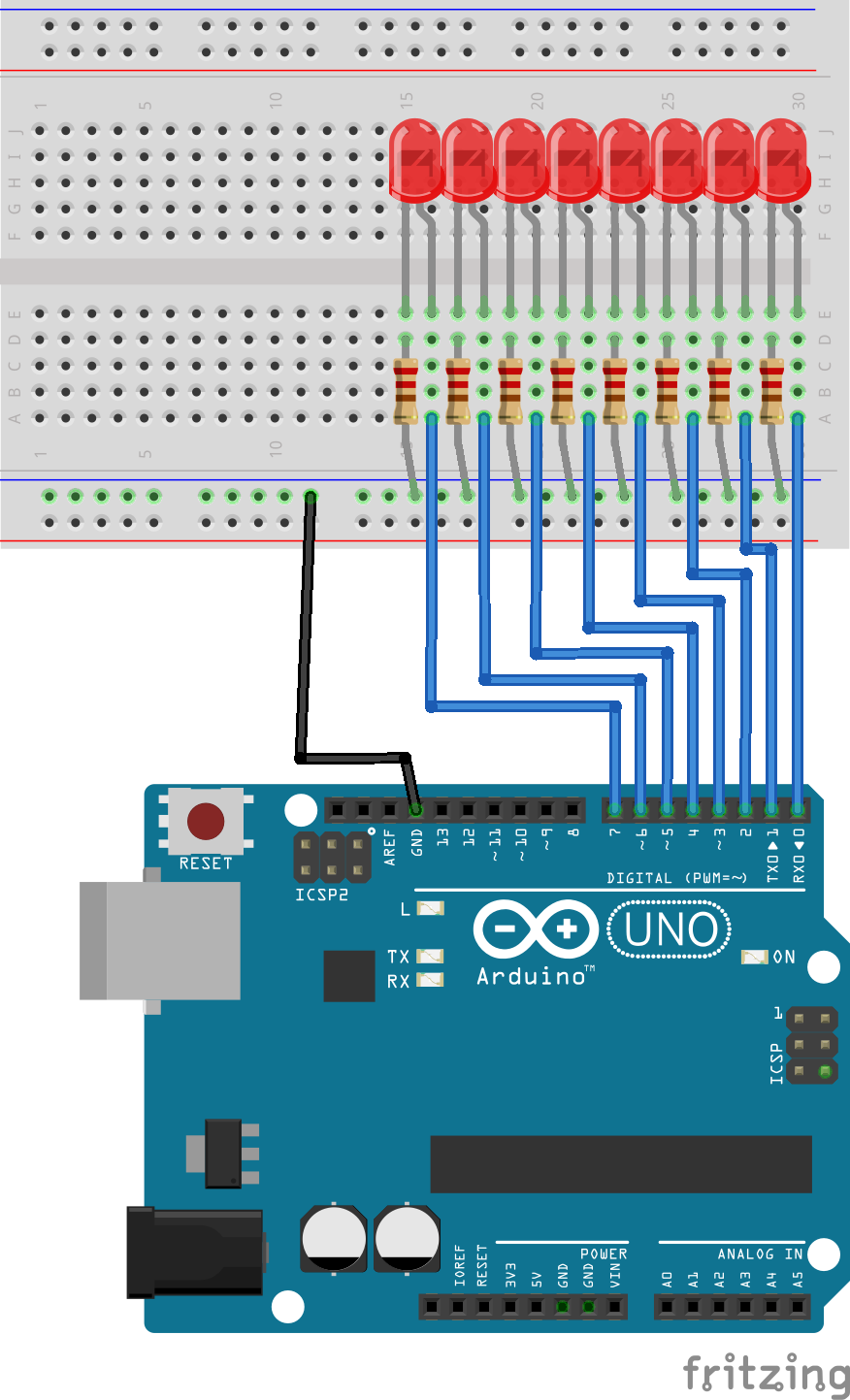
Schematics
Schamtics i95rbqcvqf


YOU MIGHT ALSO LIKE