Trybotics Logo

DS3231 RTC Module + OLED Tutorial © CC BY

DESCRIPTION

Video tutorial

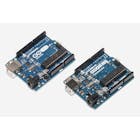
Hello and welcome to this tutorial about the DS3231 real-time clock module, and we're going to interface it with an Arduino board, I’m using an Arduino UNO as usual, but today instead of the over-used (in this website/channel) LCD screen, I’m using a 128*32 OLED display which is small and classy for little projects.

Before continuing, you can check my previous tutorials and projects about another RTC module which is the DS1302 :

Or if you’re not familiar with the OLED display: Use OLED display + Arduino with examples

If you checked my previous DS1302 tutorials or tested it, you're going to notice that it isn’t very reliable as a module and has few problems, like if you’re using it for a long time you will notice that the time is late by few minutes which is a big problem if you need precision in your projects, but don’t forget that it’s very cheap.

But for the one I’m using today, it’s also a low cost module but it’s claimed to be “extremely accurate i²c module," and thanks to it’s oscillator which is “Temperature compensated crystal oscillator (TCXO) and crystal," also a good monitoring of the main power, when it goes off the battery automatically start to keep the time, and by my little experience with this module it’s very accurate a nice to use also don’t forget that it has a built in temperature sensor that can inform you of the ambient temperature which can come very handy in projects.

Wiring

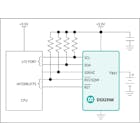
Both modules use i²c bus so the SDA and SCL for both are on A4 and A5 pins on the Arduino Uno board, those pins have double terminals as you can see, then for power the RTC uses the 5V while the OLED uses the 3.3V.

Libraries

  • DS3231 RTC library: Download from GitHub, A massive thanks to the creator who made it very simple and easy to use.
  • OLED libraries:

Download Adafruit SSD1306 library

Download Adafruit GFX library

Codes

The codes I’ve used are from the library examples: “Simple," “Date format” and “Temperature."

The other ones that I’ve used for the OLED display: Download here. (Don’t forget these codes don’t setup the date and time, so it’s better to run the “Simple” example first.)

Hope you like it and if you have any problem contact me, and consider a subscribe to the channel. 😉
Description:

Video tutorial

Hello and welcome to this tutorial about the DS3231 real-time clock module, and we're going to interface it with an Arduino board, I’m using an Arduino UNO as usual, but today instead of the over-used (in this website/channel) LCD screen, I’m using a 128*32 OLED display which is small and classy for little projects.

Before continuing, you can check my previous tutorials and projects about another RTC module which is the DS1302 :

Or if you’re not familiar with the OLED display: Use OLED display + Arduino with examples

If you checked my previous DS1302 tutorials or tested it, you're going to notice that it isn’t very reliable as a module and has few problems, like if you’re using it for a long time you will notice that the time is late by few minutes which is a big problem if you need precision in your projects, but don’t forget that it’s very cheap.

But for the one I’m using today, it’s also a low cost module but it’s claimed to be “extremely accurate i²c module," and thanks to it’s oscillator which is “Temperature compensated crystal oscillator (TCXO) and crystal," also a good monitoring of the main power, when it goes off the battery automatically start to keep the time, and by my little experience with this module it’s very accurate a nice to use also don’t forget that it has a built in temperature sensor that can inform you of the ambient temperature which can come very handy in projects.

Wiring

Both modules use i²c bus so the SDA and SCL for both are on A4 and A5 pins on the Arduino Uno board, those pins have double terminals as you can see, then for power the RTC uses the 5V while the OLED uses the 3.3V.

Libraries

  • DS3231 RTC library: Download from GitHub, A massive thanks to the creator who made it very simple and easy to use.
  • OLED libraries:

Download Adafruit SSD1306 library

Download Adafruit GFX library

Codes

The codes I’ve used are from the library examples: “Simple," “Date format” and “Temperature."

The other ones that I’ve used for the OLED display: Download here. (Don’t forget these codes don’t setup the date and time, so it’s better to run the “Simple” example first.)

Hope you like it and if you have any problem contact me, and consider a subscribe to the channel. 😉

Description:

Code_1.inoArduino
/* This code works with DS3231 RTC module and OLED display
 * It shows a format of date and time in the OLED screen and some cases the temperature too
 * Refer to www.Surtrtech.com for more details
 * This is Code #1 of the tutorial 
 */

#include <SPI.h> //i2c and the display libraries + DS3231
#include <Wire.h>
#include <Adafruit_GFX.h>
#include <Adafruit_SSD1306.h>
#include <DS3231.h>


#define SCREEN_WIDTH 128 // OLED display width, in pixels
#define SCREEN_HEIGHT 32 // OLED display height, in pixels
#define OLED_RESET    -1 // Reset pin # (or -1 if sharing Arduino reset pin)

Adafruit_SSD1306 display(SCREEN_WIDTH, SCREEN_HEIGHT, &Wire, OLED_RESET); //Declaring the display name (display)
DS3231 clock;
RTCDateTime dt;

void setup() {
  display.begin(SSD1306_SWITCHCAPVCC, 0x3C); //Start the OLED display
  clock.begin();
  delay(1000); 
  display.clearDisplay();
  display.display();

}

void loop() {                       //This code displays the Time only hours:minutes
  dt = clock.getDateTime();

  display.clearDisplay();
  display.setTextSize(3);       //size of the text that will follow              
  display.setTextColor(WHITE);  //its color            
  display.setCursor(1,1);      //position from where you want to start writing           
  display.print(dt.hour); //text todisplay
  display.print(":");
  display.print(dt.minute);
  display.display();

}
Code_2.inoArduino
/* This code works with DS3231 RTC module and OLED display
 * It shows a format of date and time in the OLED screen and some cases the temperature too
 * Refer to www.Surtrtech.com for more details
 * This is Code #2 of the tutorial 
 */

#include <SPI.h> //i2c and the display libraries
#include <Wire.h>
#include <Adafruit_GFX.h>
#include <Adafruit_SSD1306.h>
#include <DS3231.h>


#define SCREEN_WIDTH 128 // OLED display width, in pixels
#define SCREEN_HEIGHT 32 // OLED display height, in pixels
#define OLED_RESET     4 // Reset pin # (or -1 if sharing Arduino reset pin)

Adafruit_SSD1306 display(SCREEN_WIDTH, SCREEN_HEIGHT, &Wire, OLED_RESET); //Declaring the display name (display)
DS3231 clock;
RTCDateTime dt;

void setup() {
  display.begin(SSD1306_SWITCHCAPVCC, 0x3C); //Start the OLED display
  clock.begin();
  delay(1000); 
  display.clearDisplay();
  display.display();

}

void loop() {                  //This code diplays the Time (Hours:Minutes;Seconds)
  dt = clock.getDateTime();

  display.clearDisplay();
  display.setTextSize(2);       //size of the text that will follow              
  display.setTextColor(WHITE);  //its color            
  display.setCursor(1,1);      //position from where you want to start writing           
  display.print(dt.hour); //text todisplay
  display.print(":");
  display.print(dt.minute);
  display.print(":");
  display.print(dt.second);
  display.display();
  delay(1000);                //Refresh every second
}
Code_3.inoArduino
/* This code works with DS3231 RTC module and OLED display
 * It shows a format of date and time in the OLED screen and some cases the temperature too
 * Refer to www.Surtrtech.com for more details
 * This is Code #3 of the tutorial 
 */
 
#include <SPI.h> //i2c and the display libraries
#include <Wire.h>
#include <Adafruit_GFX.h>
#include <Adafruit_SSD1306.h>
#include <DS3231.h>


#define SCREEN_WIDTH 128 // OLED display width, in pixels
#define SCREEN_HEIGHT 32 // OLED display height, in pixels
#define OLED_RESET     4 // Reset pin # (or -1 if sharing Arduino reset pin)

Adafruit_SSD1306 display(SCREEN_WIDTH, SCREEN_HEIGHT, &Wire, OLED_RESET); //Declaring the display name (display)
DS3231 clock;
RTCDateTime dt;

void setup() {
  display.begin(SSD1306_SWITCHCAPVCC, 0x3C); //Start the OLED display
  clock.begin();
  delay(1000); 
  display.clearDisplay();
  display.display();

}

void loop() {               //This code displays the Time (Hours:Minutes) and the Date (Day/Month)
  
  dt = clock.getDateTime();

  display.clearDisplay();
  display.setTextSize(3);       //size of the text that will follow              
  display.setTextColor(WHITE);  //its color            
  display.setCursor(1,1);      //position from where you want to start writing           
  display.print(clock.dateFormat("H:i",dt)); //text todisplay
  display.setCursor(100,1);
  display.setTextSize(2);             
  display.println(dt.day);
  display.setCursor(100,20);
  display.print(dt.month);
  display.display();
  delay(1000);
}
Code_4.inoArduino
/* This code works with DS3231 RTC module and OLED display
 * It shows a format of date and time in the OLED screen and some cases the temperature too
 * Refer to www.Surtrtech.com for more details
 * This is Code #4 of the tutorial 
 */
 
#include <SPI.h> //i2c and the display libraries
#include <Wire.h>
#include <Adafruit_GFX.h>
#include <Adafruit_SSD1306.h>
#include <DS3231.h>


#define SCREEN_WIDTH 128 // OLED display width, in pixels
#define SCREEN_HEIGHT 32 // OLED display height, in pixels
#define OLED_RESET     4 // Reset pin # (or -1 if sharing Arduino reset pin)

Adafruit_SSD1306 display(SCREEN_WIDTH, SCREEN_HEIGHT, &Wire, OLED_RESET); //Declaring the display name (display)
DS3231 clock;
RTCDateTime dt;

void setup() {
  display.begin(SSD1306_SWITCHCAPVCC, 0x3C); //Start the OLED display
  clock.begin();
  delay(1000); 
  display.clearDisplay();
  display.display();

}

void loop() {
                                 //This code displays the Time (Hours:Minutes) and Date (Day of week/Day of month)
  dt = clock.getDateTime();

  display.clearDisplay();
  display.setTextSize(3);       //size of the text that will follow              
  display.setTextColor(WHITE);  //its color            
  display.setCursor(1,1);      //position from where you want to start writing           
  display.print(clock.dateFormat("H:i", dt)); //text todisplay
  display.setTextSize(1);
  display.setCursor(100,1);
  display.print(clock.dateFormat("D", dt));
  display.setTextSize(2);
  display.setCursor(100,10);
  display.print(clock.dateFormat("d", dt));
  display.setCursor(100,25);
  display.display();
  delay(1000);
}
Code_4_1.inoArduino
/* This code works with DS3231 RTC module and OLED display
 * It shows a format of date and time in the OLED screen and some cases the temperature too
 * Refer to www.Surtrtech.com for more details
 * This is Code #4_v2 of the tutorial 
 */
 
#include <SPI.h> //i2c and the display libraries
#include <Wire.h>
#include <Adafruit_GFX.h>
#include <Adafruit_SSD1306.h>
#include <DS3231.h>


#define SCREEN_WIDTH 128 // OLED display width, in pixels
#define SCREEN_HEIGHT 32 // OLED display height, in pixels
#define OLED_RESET     4 // Reset pin # (or -1 if sharing Arduino reset pin)

int a;
Adafruit_SSD1306 display(SCREEN_WIDTH, SCREEN_HEIGHT, &Wire, OLED_RESET); //Declaring the display name (display)
DS3231 clock;
RTCDateTime dt;

void setup() {
  display.begin(SSD1306_SWITCHCAPVCC, 0x3C); //Start the OLED display
  clock.begin();
  delay(1000); 
  display.clearDisplay();
  display.display();
  a=millis();
}

void loop() {
                            //This code displays the Time (Hours:Minutes) and Date (Day of week/Day of month) and every 6s the temperature instead of date
  dt = clock.getDateTime();
  

  display.clearDisplay();
  display.setTextSize(3);       //size of the text that will follow              
  display.setTextColor(WHITE);  //its color            
  display.setCursor(1,1);      //position from where you want to start writing           
  display.print(clock.dateFormat("H:i", dt)); //text todisplay
  display.setTextSize(1);
  display.setCursor(100,1);
  display.print(clock.dateFormat("D", dt));
  display.setTextSize(2);
  display.setCursor(100,10);
  display.print(clock.dateFormat("d", dt));
  display.setCursor(100,25);
  display.display();

  if (millis()>=a+6000 && millis()<=a+7000){     //Temperature display refresh time (every 6-7 seconds)
  dt = clock.getDateTime();
  a=millis();
  
  display.clearDisplay();
  display.setTextSize(3);       //size of the text that will follow              
  display.setTextColor(WHITE);  //its color            
  display.setCursor(1,1);      //position from where you want to start writing           
  display.print(clock.dateFormat("H:i", dt)); //text todisplay
  display.setTextSize(2);
  display.setCursor(100,1);
  display.print(clock.readTemperature(),0);
  display.setCursor(100,20);
  display.setTextSize(1);
  display.print("C");
  display.setCursor(100,25);
  display.display();
  delay(2000);        //delay of displaying the temperature
  
  }
}
Code_5.inoArduino
/* This code works with DS3231 RTC module and OLED display
 * It shows a format of date and time in the OLED screen and some cases the temperature too
 * Refer to www.Surtrtech.com for more details
 * This is Code #5 of the tutorial 
 */

#include <SPI.h> //i2c and the display libraries
#include <Wire.h>
#include <Adafruit_GFX.h>
#include <Adafruit_SSD1306.h>
#include <DS3231.h>


#define SCREEN_WIDTH 128 // OLED display width, in pixels
#define SCREEN_HEIGHT 32 // OLED display height, in pixels
#define OLED_RESET     4 // Reset pin # (or -1 if sharing Arduino reset pin)

Adafruit_SSD1306 display(SCREEN_WIDTH, SCREEN_HEIGHT, &Wire, OLED_RESET); //Declaring the display name (display)
DS3231 clock;
RTCDateTime dt;

void setup() {
  display.begin(SSD1306_SWITCHCAPVCC, 0x3C); //Start the OLED display
  clock.begin();
  delay(1000); 
  display.clearDisplay();
  display.display();

}

void loop() {                 //This code displays the Time (Hours:Minutes) and the Date (Day of the week/Day of the month/ Month)
  
  dt = clock.getDateTime();

  display.clearDisplay();
  display.setTextSize(3);       //size of the text that will follow              
  display.setTextColor(WHITE);  //its color            
  display.setCursor(1,7);      //position from where you want to start writing           
  display.print(clock.dateFormat("H:i", dt)); //text todisplay
  display.setTextSize(1);
  display.setCursor(100,1);
  display.print(clock.dateFormat("D", dt));
  display.setTextSize(2);
  display.setCursor(100,10);
  display.print(clock.dateFormat("d", dt));
  display.setCursor(100,25);
  display.setTextSize(1);
  display.print(clock.dateFormat("M", dt));
  display.display();
  delay(1000);
}
Code_6.inoArduino
/* This code works with DS3231 RTC module and OLED display
 * It shows a format of date and time in the OLED screen and some cases the temperature too
 * Refer to www.Surtrtech.com for more details
 * This is Code #6 of the tutorial 
 */

#include <SPI.h> //i2c and the display libraries
#include <Wire.h>
#include <Adafruit_GFX.h>
#include <Adafruit_SSD1306.h>
#include <DS3231.h>


#define SCREEN_WIDTH 128 // OLED display width, in pixels
#define SCREEN_HEIGHT 32 // OLED display height, in pixels
#define OLED_RESET     4 // Reset pin # (or -1 if sharing Arduino reset pin)

Adafruit_SSD1306 display(SCREEN_WIDTH, SCREEN_HEIGHT, &Wire, OLED_RESET); //Declaring the display name (display)
DS3231 clock;
RTCDateTime dt;

void setup() {
  display.begin(SSD1306_SWITCHCAPVCC, 0x3C); //Start the OLED display
  clock.begin();
  delay(1000); 
  display.clearDisplay();
  display.display();

}

void loop() {                    //This code displays the Time(Hours:minutes) as 12h format with (AM or PM) and the Date (Month/Day of the month and year)
  
  dt = clock.getDateTime();

  display.clearDisplay();
  display.setTextSize(3);       //size of the text that will follow              
  display.setTextColor(WHITE);  //its color            
  display.setCursor(1,1);      //position from where you want to start writing           
  display.print(clock.dateFormat("g:i", dt)); //text todisplay
  display.setTextSize(1);
  display.setCursor(90,1);
  display.print(clock.dateFormat("A", dt));
  display.setCursor(90,10);
  display.print(clock.dateFormat("M j", dt));
  display.setCursor(90,20);
  display.print(clock.dateFormat("Y", dt));
  display.display();
  delay(1000);
}
Code_7.inoArduino
/* This code works with DS3231 RTC module and OLED display
 * It shows a format of date and time in the OLED screen and some cases the temperature too
 * Refer to www.Surtrtech.com for more details
 * This is Code #7 of the tutorial 
 */

#include <SPI.h> //i2c and the display libraries
#include <Wire.h>
#include <Adafruit_GFX.h>
#include <Adafruit_SSD1306.h>
#include <DS3231.h>


#define SCREEN_WIDTH 128 // OLED display width, in pixels
#define SCREEN_HEIGHT 32 // OLED display height, in pixels
#define OLED_RESET     4 // Reset pin # (or -1 if sharing Arduino reset pin)

Adafruit_SSD1306 display(SCREEN_WIDTH, SCREEN_HEIGHT, &Wire, OLED_RESET); //Declaring the display name (display)
DS3231 clock;
RTCDateTime dt;

void setup() {
  display.begin(SSD1306_SWITCHCAPVCC, 0x3C); //Start the OLED display
  clock.begin();
  delay(1000); 
  display.clearDisplay();
  display.display();
}

void loop() {          //This code displays the Time( Hours:Minutes) as 12h format with (AM/PM) and Date(day of the week/Month/Day of the month)
                       //And the temperature in Fahrenheit
  
  dt = clock.getDateTime();

  display.clearDisplay();
  display.setTextSize(3);       //size of the text that will follow              
  display.setTextColor(WHITE);  //its color            
  display.setCursor(1,10);      //position from where you want to start writing           
  display.print(clock.dateFormat("g:i", dt)); //text todisplay
  display.setTextSize(1);
  display.setCursor(60,1);
  display.print(clock.dateFormat("A", dt));
  display.setCursor(95,1);
  display.print(clock.dateFormat("D", dt));
  display.setCursor(95,10);
  display.print(clock.dateFormat("Mj", dt));
  display.setCursor(95,20);
  float f=(clock.readTemperature() * 1.8) + 32; //Temperature is read in C and we convert it to F
  display.print(f,0);
  display.print(" F");
  display.display();
  delay(1000);
}
Github
https://github.com/jarzebski/Arduino-DS3231

Description:

Wiring
Wiring qtq9kgjsq9

Description:


YOU MIGHT ALSO LIKE